
 Smart AI World
Kling O1 can remember your characters, props, and scenes to create impressive consistency across multiple scenes.
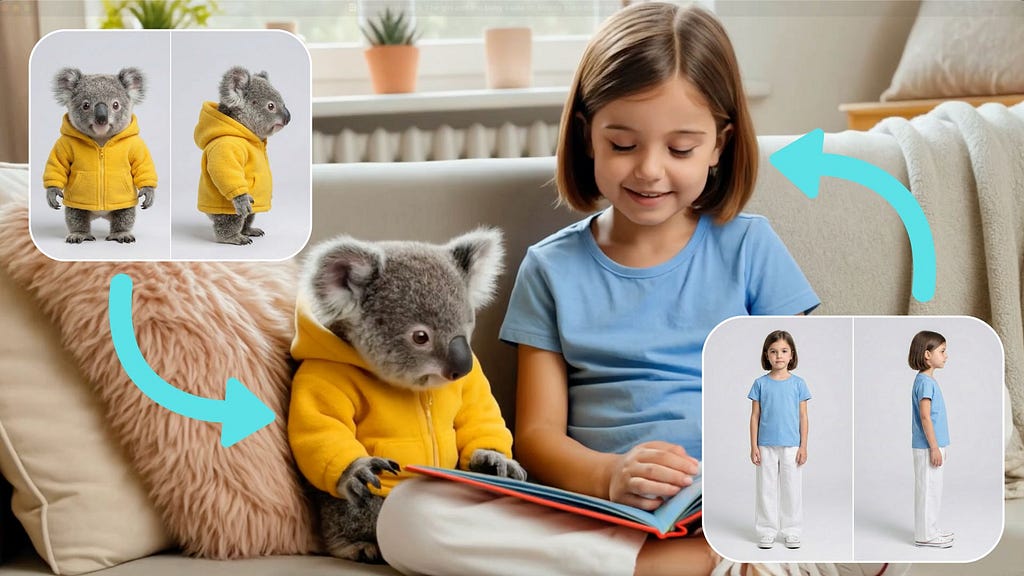
Character consistency in AI videos has long been one of the most difficult problems to resolve. You toss in a reference image of a subject and ask the AI to generate multi-scene videos with that character, but the end result often isn’t what you expect. The subject often looks slightly different in every scene, and the small attributes or accessories aren’t preserved properly.
Kling has put a lot of focus on improving this capability with the Video O1 model. It goes far beyond single characters or objects, featuring powerful multi-subject fusion capabilities. You have the freedom to mix and match multiple subjects or blend them with reference images.
Even in complex ensemble scenes or interactions, the model independently locks onto and preserves the unique features of every character and prop. No matter how drastically the environment changes, Video O1 ensures industrial-grade consistency for each of your actors across every shot.
Here’s a summary of the key features of the Kling Video O1 model:
- Unified Multi-Modal Workflow: Integrates multiple video creation and editing tasks all in one place
- Universal Input Commands: Supports text, image, video, and subject reference inputs for detailed, accurate results
- Superior Frame Consistency: Ensures character identity and visual style remain stable and consistent across shots
- Advanced Multi-Step Prompting: Allows users to combine multiple creative instructions via a single prompt
- Free-Form Scene Generation: Offers custom timing control per sequence from 3 to 10 seconds
The model is now available on platforms like Pollo AI. Just go to the video generator dashboard and set the model to Kling O1.

Pollo AI is also offering a 50% discount on the model, so it’s a great time to do a bunch of experiments.
To illustrate how cool the character consistency is, let me show you an example.
Example Video Generation
Before we get into the video generation, we need reference images of our subjects. Suppose you want to create a multi-scene sequence of two characters, you need to prepare multi-angle shots of them, like these:


Now that the subjects are ready, go back to Pollo AI’s video generator tool and upload the images as references. Make sure to set the prompt and also choose your preferred aspect ratio. In this example, I will be using this prompt to create the first scene:
Prompt: In the garden, the baby koala joyfully walks and then meets up with the little girl. The little girl says “Hi” by waving her hand to the baby koala.

Here’s what the final 10-second video looks like:
https://medium.com/media/a4c94821b7758fabe9fac7c87b8bde68/href
Awesome! The video model really maintained the appearance and clothing of both subjects across every frame. The baby koala could’ve paused a beat when the little girl said ‘Hi,’ but he still looked adorable walking slowly through the grass in his yellow hoodie.
Now, to test the character consistency feature, let’s do another scene with the same reference images but in a different environment.
Prompt: The girl and the baby koala sit beside each other on a sofa while the girl is reading a book. After two seconds, they both laugh, and the baby koala hugs the girl.
https://medium.com/media/42ec9997bb3e013dcbf2092df91c9eb3/href
Alright, perfect! The model nailed this scene, too, by keeping both subjects consistent. The facial expressions are well-rendered, and their interaction is incredibly cute. Now, the only thing left to do is stitch the two scenes together.
Up until now, we’ve been generating separate clips and talking about stitching them together later. But what if you don’t want to deal with external video editing software?
To test this out, I tried a prompt that demanded three very different shots of our characters within a single video.
Prompt: Create a three-scene video featuring the koala and the girl. Scene 1: Close-up shot of the girl smiling. Scene 2: Shot of the koala sitting beside the girl. The shot shows the koala bear waving while also showing the feet of the girl. Scene 3: The koala and the girl are running together away from the camera.
https://medium.com/media/e192387ef06914db8921f60769eea740/href
Seeing the model execute different camera angles and actions in one go, while keeping the subjects perfectly consistent, is impressive. It nailed the close-up, the specific framing of the koala next to her feet, and the final running shot without losing track of who the characters were.
This feature is useful for creating videos with quick scene changes, like teasers, music video clips, or fast-paced social media posts. It would be super cool if a future Kling update supports even longer video durations.
5 Powerful Use Cases
Here are some example scenarios where the character consistency feature can be really useful.
- Filmmaking: Kling O1 offers exceptional consistency with reference images. It also has powerful features like the Element Library that allow you to lock in characters and props for each project.
- Advertising: Traditional advertising shoots are usually costly and time-consuming. In Kling O1, you simply upload the product, model, and background images along with a simple prompt.
- Fashion: Shooting with models with different looks and sets can be a lot of work. With Kling O1, you can create a never-ending virtual runway. You just upload model photos and clothing images, input your prompts, and create lookbook videos where the clothing details are perfectly retained.
- Film Post-production: Forget about tracking and masking. In Kling O1, post-production is as simple as having a conversation. You can input natural language commands like “remove the bystanders in the background” or “make the sky blue.” The model uses deep semantic understanding to automatically complete these pixel-level adjustments.
- Social Media Content YouTubers who want to produce content like children’s short films or entertaining explainer videos can create a custom character and use it over and over again. You can even create virtual influencers and generate photos and videos of that character to post daily content.
These are just some ideas where you can take advantage of the character consistency feature. You should take the time to explore and experiment with the model to look for other ways you can use it.
Final Thoughts
Kling Video O1 is packed with a bunch of new features, but the character consistency is what really caught my attention. Regular users and even big studios looking to use AI in producing short films can definitely take advantage of this feature to create high-quality films and video ads.
The improved controllability is also a huge improvement. It allows anyone to perform complex post-production like modifying subjects, changing backgrounds, and adjusting camera views via plain language commands.
I am very impressed with this new model. Kling is now ready to take on the big boys like Veo 3.1 and Sora 2. The company is also planning to release another model that supports native audio generation, which could definitely shake up the AI video competition.
I highly encourage you to go try the Kling Video O1 model and see what you can do with all its new features. Pollo AI is currently offering the model at 50% off, so make sure to take advantage of that.

This story is published on Generative AI. Connect with us on LinkedIn and follow Zeniteq to stay in the loop with the latest AI stories.
Subscribe to our newsletter and YouTube channel to stay updated with the latest news and updates on generative AI. Let’s shape the future of AI together!

Kling O1 Video Model Finally Resolves Character Consistency was originally published in Generative AI on Medium, where people are continuing the conversation by highlighting and responding to this story.
Source link




Add comment